


How to cancel your Sunday lawn plan
You can cancel your Sunday Custom Lawn Plan at any time.
Just know that timing matters!
- If you cancel before your box shows "Order Committed" status, you'll get a full refund for that shipment and any future ones
- If your box has already shipped, check out our return policy for more info.
Quick note on skipping vs. canceling.
- Skipping a delivery pauses one shipment
- Canceling ends your whole plan
Here's how to cancel:
- Go to your Orders and subscriptions page, click 'Manage Subscriptions'
- Click ‘Manage plan’ when prompted
- If you're canceling this year's plan, you may need to click into next year's plan first, then select your current year from there
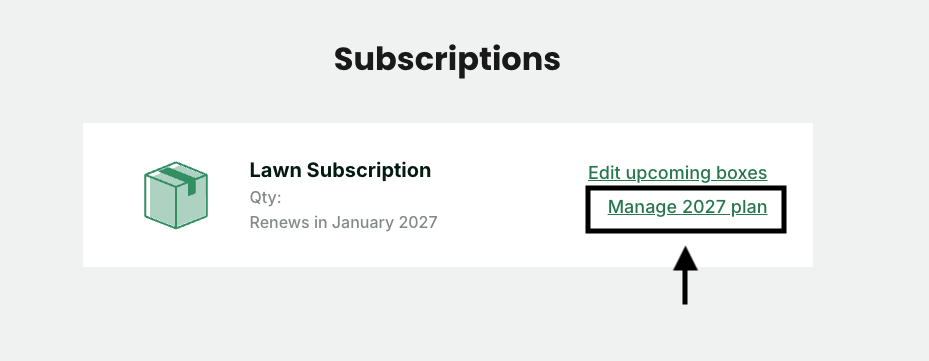
- Scroll to the bottom of the page and select ‘Cancel Subscription’
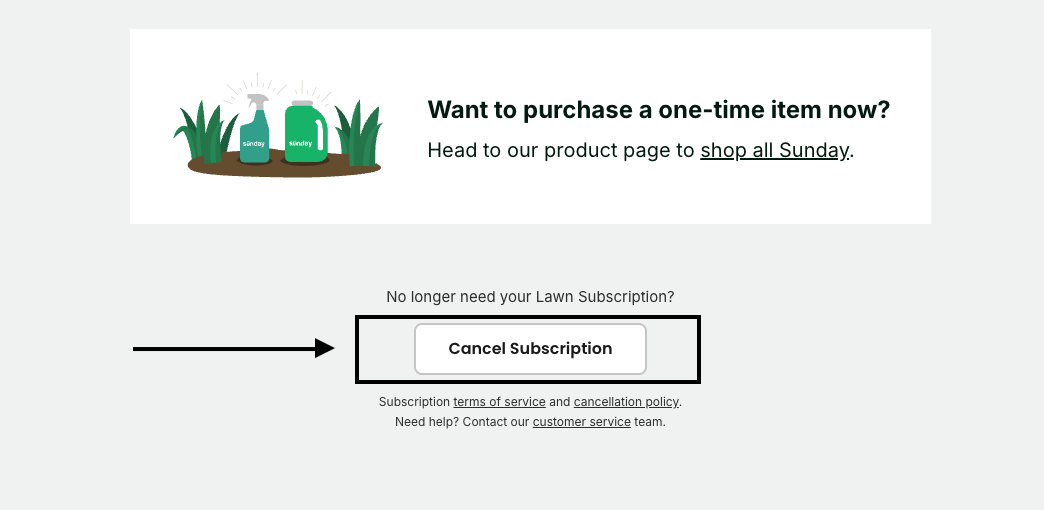
4. Follow the prompts from there
That's it.
Chat with Sunny, your AI Yard Companion, inside our mobile app! Sunny can answer all your questions about your plan, what that weed is, or how to get the best results with the Sunday product in your hand. Unlimited access, available 24/7.
Still want to talk to a real human? We’re here! Chat with us Mon-Fri 9 am-5 pm MT.